

HTTPS/AS2 Load Balancer
If your business needs to securely handle HTTP file uploads, downloads, and automated transfers at scale, SFTPPlus MFT is a powerful and flexible solution.
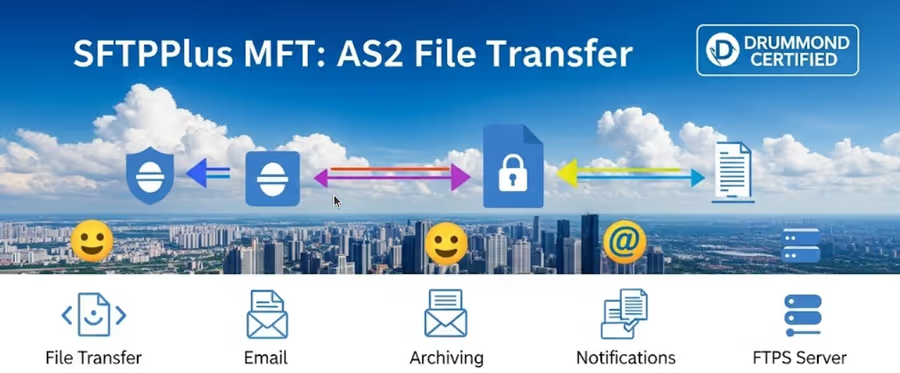
- Published
- 2025-05-19
Build a High-Availability Web File Server with SFTPPlus MFT
Web-based file transfers are a critical part of internal systems, external partner exchanges, and automated data pipelines. If your business needs to securely handle HTTP file uploads, downloads, and automated transfers at scale, SFTPPlus MFT is a powerful and flexible solution, especially when deployed with a load balancer or a cluster solution like Kubernetes.
This article describes how you can use SFTPPlus MFT to implement a robust, highly available, and secure HTTP/HTTPS file server in a clustered environment.

Scalable Architecture with Load Balancers
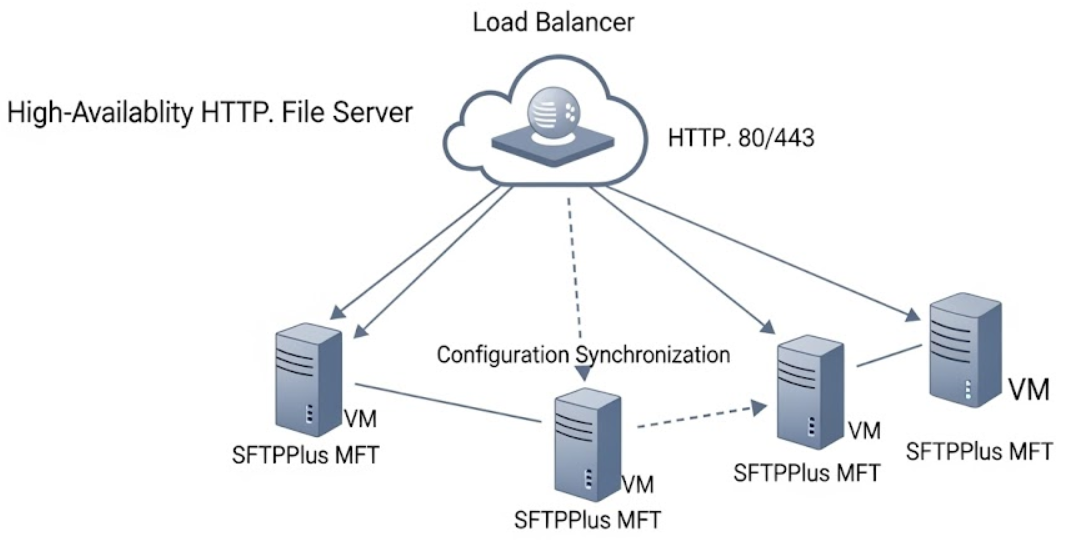
SFTPPlus MFT can be deployed on multiple VMs or containers, and is designed to work seamlessly with application and network load balancers:
- 🧱 On-premise: F5, Fortinet, NetScaler, ZScaler
- 👐 Open Source: HAProxy**, Traefik, Nginx
- ☁️ Cloud-native: AWS ALB/NLB, Azure Load Balancer, Google Cloud Load Balancer
- 🔌 TCP Load Balancers: For low-level, protocol-agnostic traffic routing
You can use SFTPPlus MFT with your preferred operating system, including Windows Server, Linux or macOS.
You only need to configure a single HTTP(S) listener on each SFTPPlus MFT instance. The load balancer will route all incoming traffic to any healthy VM in the cluster, based on availability and health checks.
🔒 TLS Termination: Your Way
SFTPPlus MFT provides full flexibility for handling HTTPS connections.
Option 1 - TLS Termination at the Load Balancer:
- Use your load balancer to terminate the HTTPS connection
- Forward traffic to SFTPPlus over plain HTTP
- Certificates and encryption are managed centrally on the load balancer
Option 2 - TLS Termination by SFTPPlus MFT:
- Let SFTPPlus terminate HTTPS directly
- Supports manual certificate management or automatic renewal via Let's Encrypt
- Works with basic network load balancers that only support port forwarding
Each VM will run a fully functional HTTPS, WebDAV and AS2 server. You can check all the available configuration options in our HTTP service documentation page.
Web-Based File Transfers + Automation
With SFTPPlus MFT, your HTTP web server isn't just for browsing files, it supports multiple secure HTTP based file transfer standards:
- 🌐 HTTP/S Web Interface: For browser-based file uploads and downloads
- 🔁 REST API: For programmatic automation and integration
- 🔄 WebDAV: For mounting remote file storage on client systems
- 📦 AS2: For B2B data exchange in compliance with standards like EDI and HIPAA
Each instance serves the same endpoints, making it easy to balance human and machine users across the cluster.
Once a file is received by any node in the cluster, SFTPPlus MFT can trigger advanced file processing rules, such as:
- 📦 Archiving files based on age, size, or user
- ☁️ Transferring the file to a remote server or cloud storage (AWS S3, Azure Blob, etc.)
- 🪄 Transforming or renaming files using custom rules
- 🔔 Notifying other systems via email, webhook, or API call
The same rules are shared with the SFTP or the FTP servers. Check this article about SFTP load balancer to read more about SFTPPlus MFT advanced managed file processing capabilities.
Cluster Configuration and synchronization
Cluster management with SFTPPlus is simple:
- A single primary VM or container is designated for configuration.
- All other nodes automatically receive a full, synchronized copy of the configuration.
- Load-balanced traffic continues to flow even if the primary VM is offline.
- Each SFTPPlus MFT instance has a complete local copy of the config available even after a reboot.
- Each instance will keep the logs in a local file.
🔍 Full Audit & Compliance Logging:
- Detailed logs of every transfer and user action
- Logs include administrative actions and configuration management
- Compatibility with SIEM and log aggregation tools
- Audit trails for regulatory compliance (e.g., GDPR, HIPAA, SOX)
Every node logs its own actions, so your visibility remains intact, even in a distributed cluster.
Deploying SFTPPlus MFT with Azure Application Gateway
Here's how to deploy a load-balanced, TLS-enabled HTTP file server using Azure Application Gateway:
🧱 Step 1 - Create Your VM Cluster:
- Deploy 2+ Azure VMs or containers, each running SFTPPlus MFT.
- Ensure each instance has a single HTTP/HTTPS listener enabled (e.g., port 80 or 443).
- Designate one VM as the primary node for configuration.
🔁 Step 2 - Configure Configuration Sync:
- Enable SFTPPlus clustering so that the secondary VM will pull the configuration from the primary VM..
- All VMs must have access to a shared Azure File folder.
🔐 Step 3 - Setup Azure Application Gateway:
- In Azure, create an Application Gateway (v2).
- Configure a frontend IP (public or private) and a listener on port 443 (HTTPS).
- Choose between:
- SSL termination at the Gateway (recommended for centralized TLS)
- End-to-end TLS with SFTPPlus MFT handling certificates directly
⚙️ Step 4 - Backend Pool and Probes:
- Add all SFTPPlus VM private IPs to the backend pool
- Configure custom health probes that hit a known path like
/\_\_chsps\_\_/theme/favicon.ico - Enable round-robin routing or configure session affinity as needed
🌐 Step 5 - DNS + Access:
- Point your domain (e.g.,
files.company.com) to the Application Gateway frontend IP - Users will connect via HTTPS to a highly available endpoint, with seamless VM failover
Azure Application Gateway automatically scales and protects your infrastructure while SFTPPlus MFT handles the file logistics behind the scenes.
Why Choose SFTPPlus MFT for Your Web File Server?
With SFTPPlus MFT and a load balancer, you get:
✅ High availability for browser-based and automated file transfers ✅ Seamless support for HTTP/S, WebDAV, REST API, and AS2 ✅ Flexible TLS management (load balancer or direct termination) ✅ Centralized configuration with automatic cluster sync ✅ Advanced automation for post-upload processing ✅ Detailed audit logging for compliance and monitoring
Whether you're replacing legacy web servers or building a new hybrid-cloud data exchange system, SFTPPlus MFT offers enterprise-grade file transfer with modern scalability and security.
💡 Ready to set up your high-availability web file server? Let us know if you'd like to see example configurations, deployment diagrams, or container orchestration templates by getting in touch with our dedicated support team.