

File transfer audit logs and activity tracking
SFTPPlus MFT creates structured audit events for file transfers, authentication, administration, and file processing. Administrators can investigate activity in the Web Manager and configure event handlers to write selected events to files or standard output. This gives teams a consistent record for troubleshooting, operational monitoring, and transfer audits.
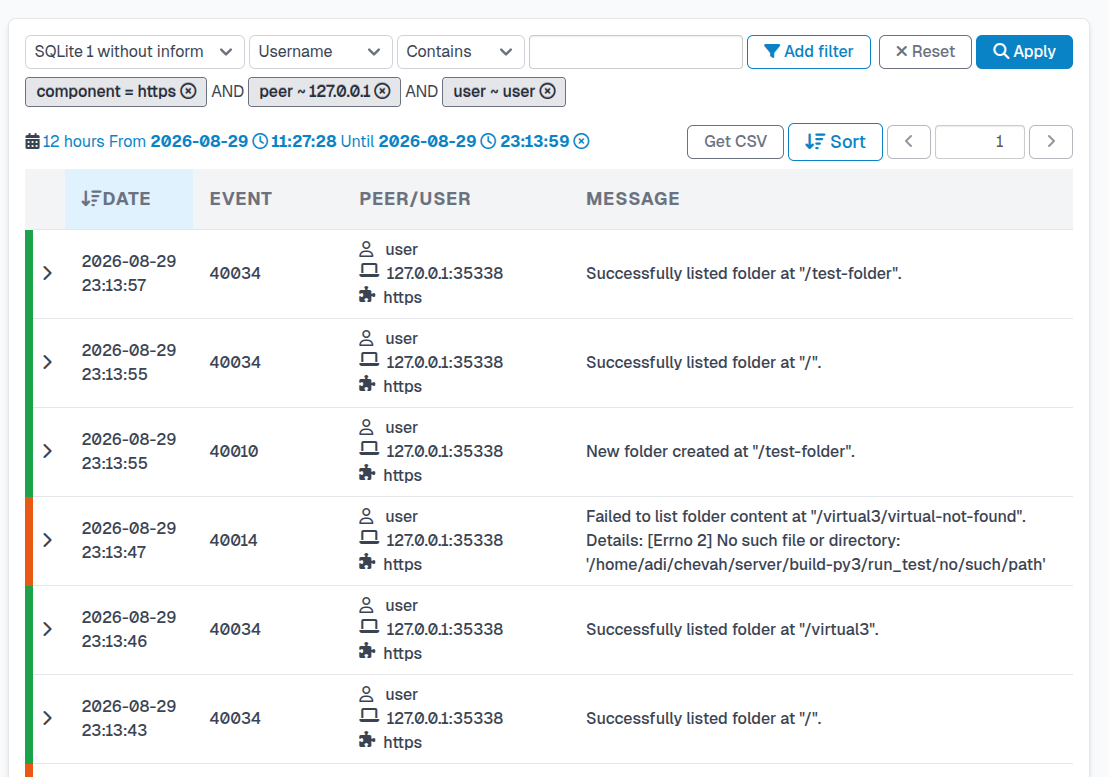
Structured audit events
SFTPPlus records actions performed by end users, automated transfers, and administrators as events. Event details support automated responses and provide an audit trail for individual operations.
Events include actions such as:
- File uploads, downloads, and deletions
- Connection attempts and authentication operations
- Configuration updates and administrative changes
This event-based approach provides the foundation for both operational monitoring and compliance auditing.
Activity Log
The activity log is the central record of all events generated by SFTPPlus. It allows administrators to review and analyze every operation across the system, from the creation of a file to its final download or removal.
Depending on the event, available details include:
- The user or process that triggered the action
- The source IP address and port
- The time and date of the event
- The SFTPPlus component responsible for the action
- The event group (such as transfer, admin, or authentication)
- Additional metadata describing the operation in structured format
The activity log is a key tool for auditing file transfers and troubleshooting errors, helping administrators trace any issue through the complete sequence of related actions.
Search and collect audit logs
SFTPPlus provides an embedded web management interface that includes tools to view, search, and filter the activity log. This interface allows administrators to quickly locate specific events and analyze transfer activity in real time.
Activity data can also be written to multiple local text, CSV, or Logfmt files. Each file can have its own event filters, entry format, storage path, rotation schedule, and retention limit. The standard output event handler can write text or Logfmt records for log collectors that read process output. These options let audit and operations teams collect different views of the same transfer activity without maintaining a separate log-splitting process. See the audit log file solution for examples of complete logs, critical error logs, and transfer reports.
Connect audit events to monitoring systems
SFTPPlus can send selected events to a Syslog server or an HTTP endpoint. Log collectors can forward local files or standard output to existing monitoring and SIEM systems. SFTPPlus handles event selection and formatting, while the collection platform handles transport, dashboards, and alerts.
For application health monitoring, SFTPPlus also exposes Prometheus process metrics, including memory usage, CPU time, and event loop delay. Use these metrics alongside the audit events that record individual connections, authentication attempts, and file operations.